Update, October 2026: this prototype has since grown into CityGraph, a geospatial knowledge-graph platform I designed and built for Let’s Map Bainbridge. There’s more on my site.
Building a Community Mapping Platform: Part 1
I’ve spent much of the last month building a prototype map as part of my Let’s Map Bainbridge project. While collaborating with others on how Let’s Map Bainbridge might work as an organization, I’ve handled all the technical architecture myself. Here’s what’s involved in getting the map to your browser.
I’ll write about how the data gets into PostGIS in another blog post. That’s where it gets really interesting.
letsmapbainbridge.org
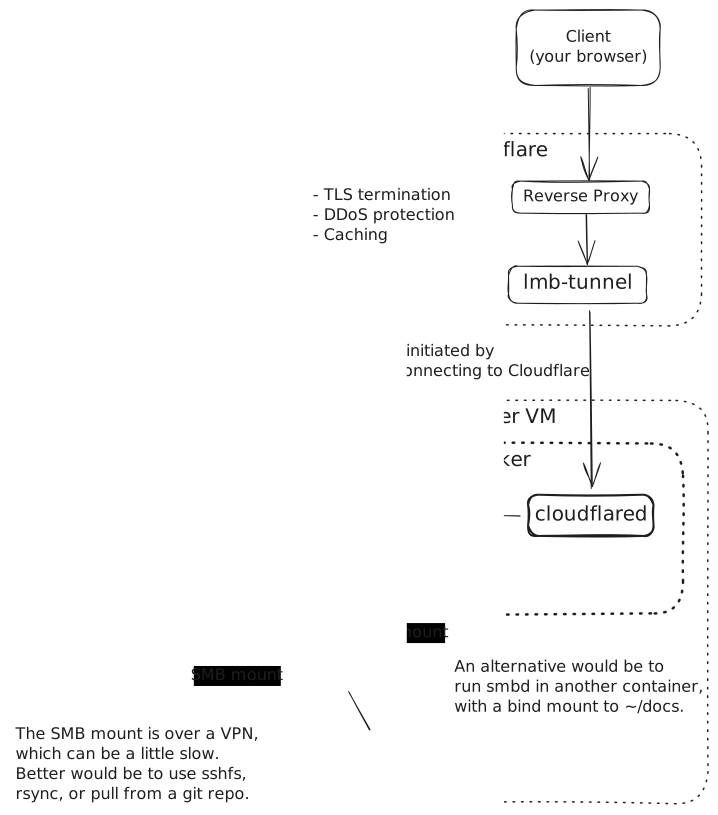
The website uses Markdown Madness. This little server is really designed just to render Markdown documents as you’re developing them. But I have the server running in a Docker container on a Hetzner VM (in the Hillsboro, Oregon data center), and a Cloudflare tunnel to make it public.
To edit the content, I either ssh into the VM and edit the content live using emacs, or mount the folder using Samba from my Mac and use Visual Studio Code to edit it. I could edit the code elsewhere and just git pull on the VM, but I don’t usually bother. This works well for rapid prototyping and iteration.
I’ll probably end up moving the site to Cloudflare Pages. It doesn’t need to be this complicated until the main LMB website needs to be dynamic.
maps.letsmapbainbridge.org
The single-page app that lets you use the slippy map is a static site hosted on Cloudflare Pages, a static site hosting service that pulls from a GitHub repo, builds your site, and serves the files from the edge. For this site in particular, all the building happens on my developer machine. There’s no static site framework involved; I worked with Claude Code to build something simple that works.
I designed it, Claude Code wrote much of the code, and I read and reviewed every change as we went: a deliberately small prototype, built to be easy to change.
As well as the HTML, CSS and JavaScript, the site has the MapLibre GL JS style file that defines how the map looks, along with what MapLibre needs to render fonts and icons. I’ll write about fonts and icons in another post.

tiles.letsmapbainbridge.org
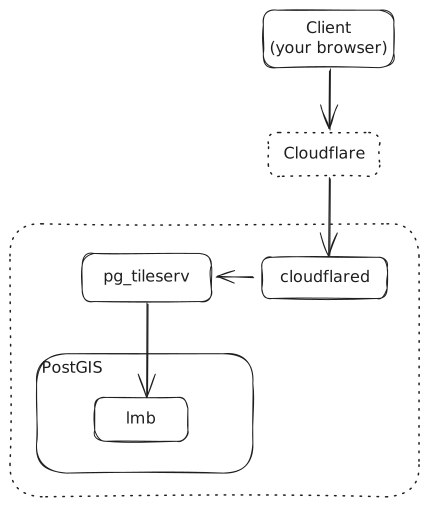
Another VM in the cluster runs PostgreSQL with the PostGIS extension. This is where the OpenStreetMap and other data lives. The vector tiles are served using pg_tileserv, a very thin PostGIS-only tile server that takes HTTP tile requests, executes some SQL, and returns binary MVT tiles. It lets PostGIS do all the hard work: mostly using the ST_AsMVT function to generate the MVT tiles. The tile server runs on a VM on my own servers, in a Proxmox cluster, with a Cloudflare tunnel connected.
Monitoring these services
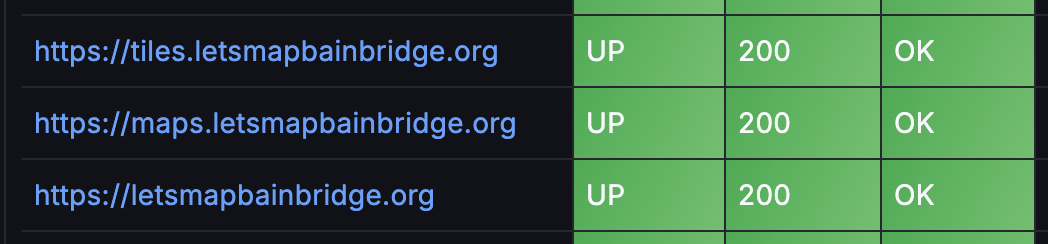
I keep an eye on what’s up and running using Prometheus, using its blackbox_exporter to probe the websites, at least to check they’re giving a 2xx response. And Grafana for visualization. I don’t yet have any alerting.
Version control
Everything lives on GitHub, but also on a Gitea instance running in a Docker container in my Proxmox cluster, so I can carry on pushing commits somewhere that’s not my laptop, in case the wind blows in the wrong direction and I lose my Internet connection.